最近、ReactやVueなどVirtualDOMを使った技術がトレンドになっています。VirtualDOMの特徴として、DOMの状態を管理から開放されて、変数を変えるだけで自動的に表示に反映される仕組みがあります。
変数の変更を感知し、表示に反映するために使われるのがProxyになります。VirtualDOMに限らず使える場面が多いオブジェクトなので、ぜひ使い方を覚えましょう。
基本的な使い方
Proxyはオブジェクトまたは配列に対してしか使えません。単なる数字や文字列では使えないので注意してください。以下はごく基本的なコードです。
This file contains hidden or bidirectional Unicode text that may be interpreted or compiled differently than what appears below. To review, open the file in an editor that reveals hidden Unicode characters.
Learn more about bidirectional Unicode characters
| const obj = {}; | |
| const p = new Proxy(obj, { | |
| get: (target, name) => { | |
| console.log(`(get) target : ${JSON.stringify(target)}, name: ${name}`); | |
| return target[name]; | |
| }, | |
| set: (target, name, value) => { | |
| console.log(`(set) target : ${JSON.stringify(target)}, name: ${name}`); | |
| target[name] = value; | |
| } | |
| }); | |
| p.a = "hello"; | |
| p.a | |
| // -> hello |
まずProxyは既存の変数にとハンドラーを引数に取ります。
This file contains hidden or bidirectional Unicode text that may be interpreted or compiled differently than what appears below. To review, open the file in an editor that reveals hidden Unicode characters.
Learn more about bidirectional Unicode characters
| const obj = {}; | |
| const p = new Proxy(obj, handler); |
handlerはget/setを基本としたオブジェクトになります。値を追加した時にset、アクセスした際にgetがコールされます。targetは元のオブジェクト(obj)で、nameはアクセスしようとしたメソッド名(またはキー)になります。そしてvalueとして適用しようとした値が送られます。
This file contains hidden or bidirectional Unicode text that may be interpreted or compiled differently than what appears below. To review, open the file in an editor that reveals hidden Unicode characters.
Learn more about bidirectional Unicode characters
| set: (target, name, value) => { | |
| target[name] = value; | |
| } |
getはターゲットと実行するメソッド名(またはキー)が送られてきます。
This file contains hidden or bidirectional Unicode text that may be interpreted or compiled differently than what appears below. To review, open the file in an editor that reveals hidden Unicode characters.
Learn more about bidirectional Unicode characters
| set: (target, name, value) => { | |
| target[name] = value; | |
| } |
配列の場合
Proxyはオブジェクトだけでなく配列にも使えます。
This file contains hidden or bidirectional Unicode text that may be interpreted or compiled differently than what appears below. To review, open the file in an editor that reveals hidden Unicode characters.
Learn more about bidirectional Unicode characters
| const ary = []; | |
| const q = new Proxy(ary, { | |
| get: (target, name) => { | |
| console.log(`(get) target : ${JSON.stringify(target)}, name: ${name}`); | |
| return target[name]; | |
| }, | |
| set: (target, name, value) => { | |
| console.log(`(set) target : ${JSON.stringify(target)}, name: ${name}`); | |
| target[name] = value; | |
| } | |
| }); | |
| q.push('a'); | |
| q.push('b'); | |
| q.push('c'); | |
| console.log(q[0]); |
使い方はオブジェクトの時と変わりません。ただし、配列の中にオブジェクトがあった場合、そのオブジェクトの中を変えても通知されないので注意が必要です。
This file contains hidden or bidirectional Unicode text that may be interpreted or compiled differently than what appears below. To review, open the file in an editor that reveals hidden Unicode characters.
Learn more about bidirectional Unicode characters
| q.push({ | |
| a: 'b', | |
| c: 'd' | |
| }); | |
| // 以下は通知されません | |
| q[3].a = 'e'; |
他のオブジェクト
他のオブジェクト(関数、クラス)などに対してもProxyが使えます。ただしクラスなどでインスタンスに対して適用したい場合は、クラスではなくインスタンスに対してProxyを適用する必要があります。
This file contains hidden or bidirectional Unicode text that may be interpreted or compiled differently than what appears below. To review, open the file in an editor that reveals hidden Unicode characters.
Learn more about bidirectional Unicode characters
| class Animal { | |
| constructor() { | |
| this.name = ''; | |
| } | |
| setName(name) { | |
| this.name = name; | |
| } | |
| getName() { | |
| return this.name; | |
| } | |
| } | |
| const dog = new Proxy(new Animal, { | |
| get: (target, name) => { | |
| console.log(`(class get) target : ${JSON.stringify(target)}, name: ${name}`); | |
| return target[name]; | |
| }, | |
| set: (target, name, value) => { | |
| console.log(`(class set) target : ${JSON.stringify(target)}, name: ${name}`); | |
| target[name] = value; | |
| } | |
| }); | |
| dog.setName('dog'); | |
| console.log(dog.getName()); |
Proxyを使うと、データを更新した時に関連するデータや表示をまとめて更新するといったことが簡単にできます。また、値を判別して例外を出すことで入力チェックのように使うこともできます。
ぜひProxyを使って関連する処理をまとめてみてください。
Webサイトでは不特定多数の人たちがサービスに触れます。その結果、悪意を持ったユーザによってWebページを改ざんされたり、不用意なJavaScriptを実行したりするリスクが発生します。
運営側で予期していないJavaScriptの実行を制限するのに使えるのがnonceです。CSP(コンテンツセキュリティポリシー)によって実行できるJavaScriptを制限できます。
仕組み
JavaScriptのnonceはクライアントサイドだけでは実装できません。まずHTMLを出力する際にレスポンスヘッダーにてnonceを出力する必要があります。以下はnode/Expressで実装した場合です。
This file contains hidden or bidirectional Unicode text that may be interpreted or compiled differently than what appears below. To review, open the file in an editor that reveals hidden Unicode characters.
Learn more about bidirectional Unicode characters
| const uuidv4 = require('uuid/v4'); | |
| nonce = uuidv4(); | |
| res.setHeader('Content-Security-Policy', `script-src 'nonce-${nonce}' 'strict-dynamic'`) |
nonceは nonce- という文字列ではじまっている必要があります。
HTML側
HTML側ではそのnonce(今度はnonce-は不要です)をscriptタグのnonce要素として出力します。
This file contains hidden or bidirectional Unicode text that may be interpreted or compiled differently than what appears below. To review, open the file in an editor that reveals hidden Unicode characters.
Learn more about bidirectional Unicode characters
| <script> | |
| alert('Unsafe JavaScript'); | |
| </script> | |
| <script nonce="<%= nonce %>"> | |
| alert('Safe JavaScript'); | |
| </script> |
例えば上記のように記述されていた場合、Unsafe JavaScriptというアラートは出ません。
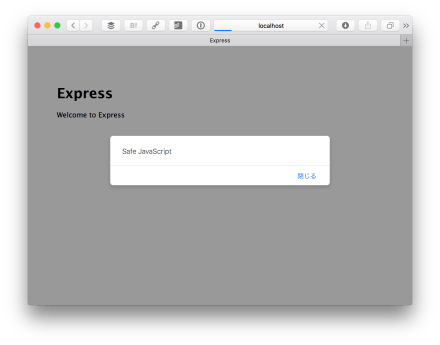
開発者コンソールで見ると、Unsafeの方はCSPエラーが出ています。

このようにして実行できるJavaScriptを制御できます。なお、nonceは常にユニークである必要があるので、uuidを使ったり、ランダムな文字列を生成するライブラリと組み合わせて使うのがいいでしょう。
従来、Webサイト間はリンクでつながっており、リンクを辿った際にはリファラーが送信される仕組みになっていました。しかしプライバシーの保護であったり、URL中に機密情報が含まれていた場合に問題になるため、送信されないことも多々あります。
HTML5.2ではリファラーポリシーが追加され、リファラーの送信について細かく制御できるようになります。
リファラーポリシーの設定法
リファラーポリシーはHTMLのmetaタグで指定します。
This file contains hidden or bidirectional Unicode text that may be interpreted or compiled differently than what appears below. To review, open the file in an editor that reveals hidden Unicode characters.
Learn more about bidirectional Unicode characters
| <meta name="referrer" content="origin"> |
リファラーポリシーの種類について
HTML5.2によって設定できるリファラーポリシーが増えています。これまでは以下の3パターンでした。
- origin
スキーマ、ドメインのみを送ります
- no-referrer
リファラーを送りません
- no-referrer-when-downgrade
HTTPSからHTTPへのアクセス時にはリファラーを送りません
- same-origin
同じドメインであればリファラーを送信します。サブドメインでは送信しません。
- strict-origin
HTTPS同士での同じドメイン(サブドメイン含む)へのアクセスにおいてリファラーを送信
- origin-when-cross-origin
同じオリジンであればURL全体を送信しますが、スキーマが異なる際にはオリジンしか送信しません
- strict-origin-when-cross-origin
同じオリジンであればURL全体を送信します。サブドメインではドメインしか送信しません。スキーマが異なる際にはリファラーを送信しません
- unsafe-url
HTTP/HTTPS関係なくリファラーを送信します。
同じドメインであるかどうか、スキーマがHTTPかHTTPSであるかによって送信する情報が異なってきます。
影響範囲
適用されるのはa/area/img/iframe/linkタグになります。
リファラーポリシーを適切に設定することで、Webアプリケーションをセキュアに運用できるようになります。すべて防いでしまえばセキュアになりますが、リファラーの値によって制御するといったことはできなくなります。外部リソースを使うのが当たり前になっている現在、リファラーポリシーを使って安全な運営に努めてください。
hifiveには頻繁に使われるであろう機能をAPIとしてまとめており、h5.apiというネームスペースでアクセスできるようになっています。
今回はlocalStorageを便利にしてくれるh5.api.storageについて紹介します。
localStorageの利用可否を判定する
通常、WebブラウザがlocalStorageをサポートしているかどうかはwindow.localStorageという変数のあるなしで判定されます。
This file contains hidden or bidirectional Unicode text that may be interpreted or compiled differently than what appears below. To review, open the file in an editor that reveals hidden Unicode characters.
Learn more about bidirectional Unicode characters
| if (window.localStorage) { | |
| // localStorageをサポート | |
| } else { | |
| // localStorageをサポートしていない | |
| } |
しかしこの方法の場合、iOS/macOSのSafariにおけるプライベートブラウジングを使っている際に問題があります。この時には window.localStorage という変数は存在するものの、実際に書き込みを行うと QuotaExceededError が発生します。
This file contains hidden or bidirectional Unicode text that may be interpreted or compiled differently than what appears below. To review, open the file in an editor that reveals hidden Unicode characters.
Learn more about bidirectional Unicode characters
| > localStorage.setItem("key", "val"); | |
| QuotaExceededError (DOM Exception 22): The quota has been exceeded. |
そうした場合を踏まえて h5.api.storage.isSupported を使うと正しく localStorage の利用可否を判定できます。
ループ処理をサポートするeachメソッド
この他、ちょっと便利なeachメソッドが用意されています。
This file contains hidden or bidirectional Unicode text that may be interpreted or compiled differently than what appears below. To review, open the file in an editor that reveals hidden Unicode characters.
Learn more about bidirectional Unicode characters
| h5.api.storage.local.each((index, key, val) => { | |
| // 順番に処理 | |
| }); |
セッションストレージも使えます。
This file contains hidden or bidirectional Unicode text that may be interpreted or compiled differently than what appears below. To review, open the file in an editor that reveals hidden Unicode characters.
Learn more about bidirectional Unicode characters
| h5.api.storage.session.each((index, key, val) => { | |
| // 順番に処理 | |
| }); |
オブジェクトの保存にも対応
保存時に serialize 、取得時に deserialize していますので文字列以外であっても扱えるようになっています。
幾つのキーがあるか判定できる getLength メソッド
これは localStorage.length を実行しているだけです。
This file contains hidden or bidirectional Unicode text that may be interpreted or compiled differently than what appears below. To review, open the file in an editor that reveals hidden Unicode characters.
Learn more about bidirectional Unicode characters
| > h5.api.storage.local.getLength(); | |
| 5 | |
| > h5.api.storage.session.getLength(); | |
| 3 |
機能自体は小粒ですが、頻繁に使われるであろう機能をまとめておくことで開発が効率的になります。ぜひお使いください。
HTML5にはドラッグ&ドロップAPIが追加されました。これによってローカルファイルをドラッグ&ドロップでアップロードしたり、DOM同士をドラッグ&ドロップできるようになりました。
このAPIも素のままでは使いづらいところがあります。そこで今回は利便性を高めてくれるライブラリを紹介します。
Shopify/draggable: The JavaScript Drag & Drop library your grandparents warned you about.

Shopifyが開発しているドラッグ&ドロップライブラリです。DOM向けのライブラリで、ドラッグするオブジェクトごとにドロップできる場所を定義できます。スワップのようなオブジェクト同士を入れ替える機能もあります。
さらにドロップした後のソートであったり、ドロップできない場所に持っていくと震えるといったイベントの設定もできます。
Shopify/draggable: The JavaScript Drag & Drop library your grandparents warned you about.
feross/drag-drop: HTML5 drag & drop for humans

onDrop/onDropTextといったイベントを購読できるようになります。ファイルをドラッグしてきたら特定のDOMを変化させたり、ドロップしたファイルを受け取れます。また、テキストのドラッグ&ドロップも可能です。
feross/drag-drop: HTML5 drag & drop for humans
bevacqua/dragula: Drag and drop so simple it hurts

DOM同士のドラッグ&ドロップに対応したライブラリです。DOM全体をドラッグ可能にすることも、ハンドルをつけてその部分だけをドラッグ可能に指定することもできます。
bevacqua/dragula: Drag and drop so simple it hurts
ドラッグ&ドロップができるとアプリケーション感が強くなります。ローカルファイルはもちろんのこと、Gmailのように別なボックスに振り分けるのも直感的になります。使いこなすのは難しいですが、今回紹介したライブラリを使えば大幅に工数が削減されるはずです。
業務に必要なデータは幾つかのシステムにまたがっていることは少なくありません。そうした時に、それぞれのシステムにログインしてステータスをチェックするのは面倒です。そこで便利なのがダッシュボードです。
ダッシュボードは必要なデータをまとめてチェックするのに適しています。今回はそうしたダッシュボードを作るのに最適なライブラリを紹介します。
codaxy/dashboards: Drag & drop dashboard builder!
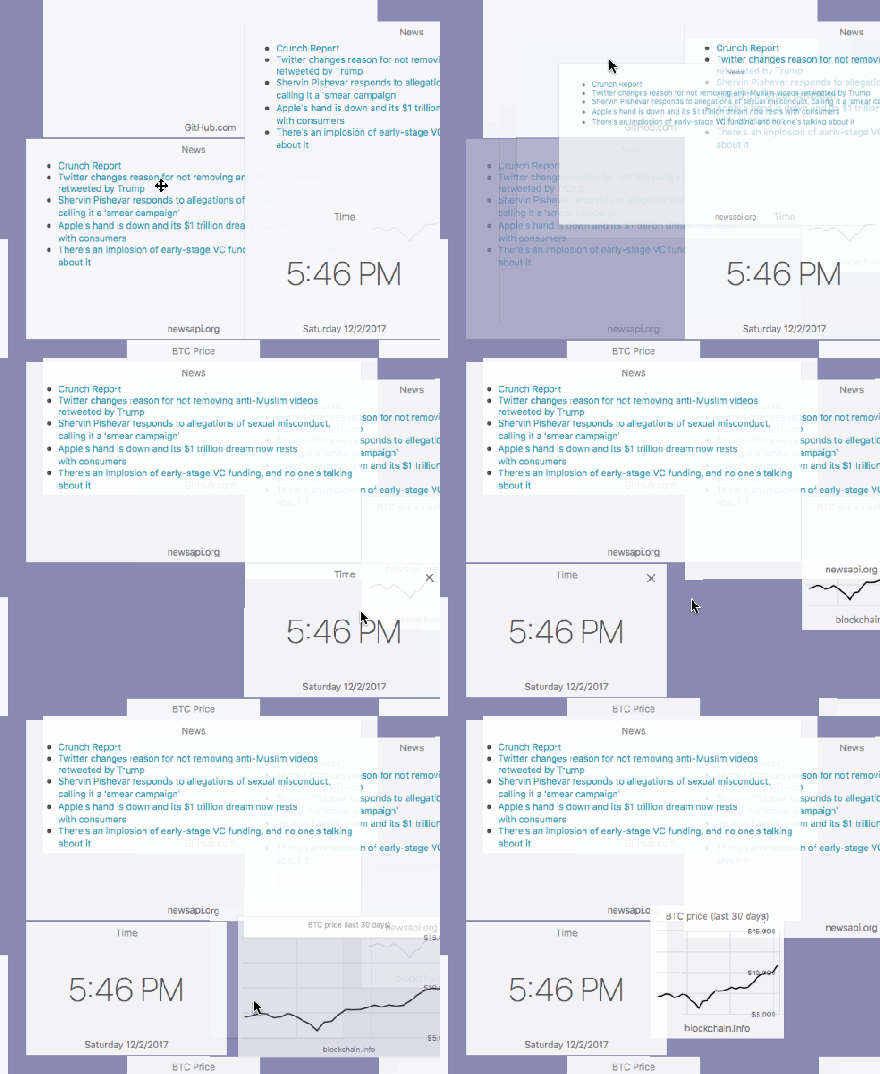
あらかじめ用意されたウィジェットをドラッグ&ドロップで配置してダッシュボードを作成するソフトウェアです。配置はとても柔軟で、ウィジェット同士を重ねて配置することもできます。
背景色やダッシュボード全体のサイズを変更することもできます。
codaxy/dashboards: Drag & drop dashboard builder!
gridstack/gridstack.js: gridstack.js is a jQuery plugin for widget layout
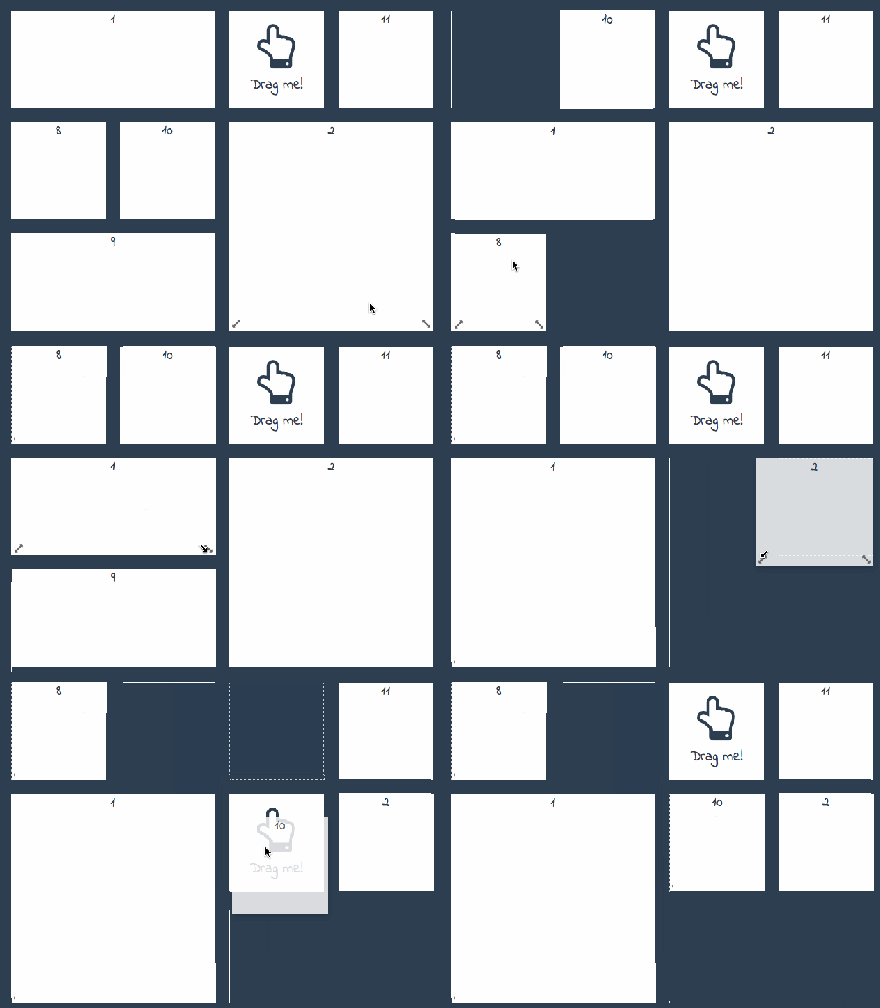
あらかじめ決められたグリッドに沿ってウィジェットを配置します。グリッドは複数の枠にまたがって配置することも可能です。配置データはJSONになっているので、それを使って配置の再現も可能です。
gridstack/gridstack.js: gridstack.js is a jQuery plugin for widget layout
jerrywham/SonarRSS: Netvibes minimalist alternative

フィードを配置するのに特化したダッシュボードです。最初はタイトルだけですが、クリックすると本文も表示されます。情報のビジュアル化には向きませんが、一覧でまとめて新着情報をチェックしたいといったニーズに使えそうです。
jerrywham/SonarRSS: Netvibes minimalist alternative
oazabir/Droptiles: Droptiles is a “Windows 8 Start” like Metro-style Web 2.0 Dashboard. It compromises of Live Tiles. Tiles are mini apps that can fetch data from external sources. Clicking on a tile launches the full application.
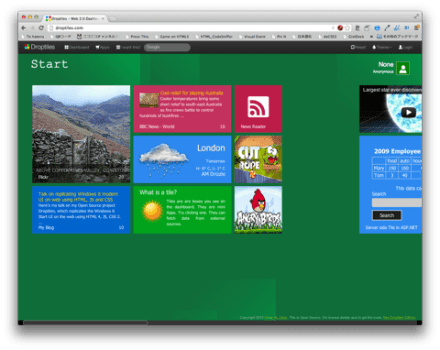
Windows8 Style UIに近いダッシュボードです。パネルの配置は自分で変更できます。基本的に横スクロール型のUIとなっています。テーマごとにブロックを分けられるので、グルーピングにも向いています。
Shopify/dashing: The exceptionally handsome dashboard framework in Ruby and Coffeescript.
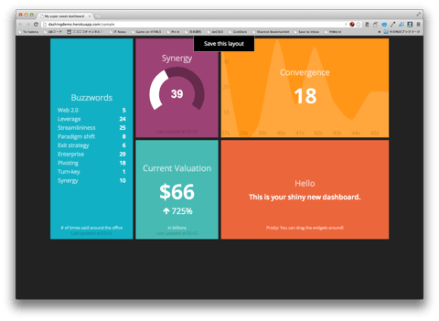
デザインがすっきりとした、モダンなUIのダッシュボードです。グラフを描画することも可能です。グリッド型になっているので、配置はそれに沿って変更できるようになっています。
Shopify/dashing: The exceptionally handsome dashboard framework in Ruby and Coffeescript.
ducksboard/gridster.js: gridster.js is a jQuery plugin that makes building intuitive draggable layouts from elements spanning multiple columns
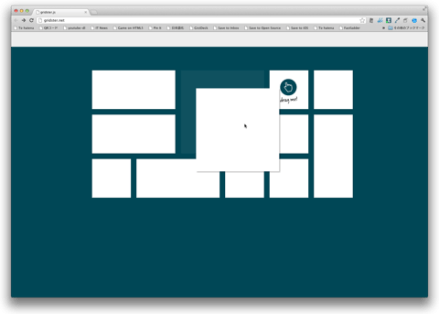
Pinterestライクにグリッドが重なったUIになっています。利用する最小のカラム数、行数が指定できます。グリットに沿った形で配置を自由に変更できます。
ダッシュボードは特に並び替え、配置換えが必要です。それによって担当者一人一人に最適化されたUIが実現できます。作業効率も変わってくるでしょう。どこまで自由にカスタマイズできるかはライブラリ次第です。
開発者は個々のウィジェットを開発します。Web APIをうまく使えば多数のシステムからまとめてデータを収集して表示できるようになるでしょう。
Onsen UIというモバイルアプリ向けのUIフレームワークがあります。HTML5とJavaScript、CSSを使ってスマートフォンアプリを作るハイブリッドアプリ用のUIフレームワークになります。UIをネイティブアプリ風にしてくれるのはもちろん、画面のスワイプであったり、リスト表示などをネイティブアプリ風の操作にしてくれます。
そんなOnsen UIをhifiveと組み合わせて使う方法を紹介します。今回はejsと組み合わせた表示更新について紹介します。
利用するソフトウェア/ライブラリ
- Bower
- hifive
- Onsen UI
- jQuery
インストール
まず各ライブラリをインストールします。インストールはBowerを使って行います。
This file contains hidden or bidirectional Unicode text that may be interpreted or compiled differently than what appears below. To review, open the file in an editor that reveals hidden Unicode characters.
Learn more about bidirectional Unicode characters
| $ bower install hifive jquery onsenui –save |
今回は .bowerrc という設定ファイルを作成し、ライブラリのインストール先を指定しています。
This file contains hidden or bidirectional Unicode text that may be interpreted or compiled differently than what appears below. To review, open the file in an editor that reveals hidden Unicode characters.
Learn more about bidirectional Unicode characters
| { | |
| "directory": "public/components" | |
| } |
index.htmlの作成
次に public/index.html を作成します。インストールしたライブラリを読み込んでいるだけです。
This file contains hidden or bidirectional Unicode text that may be interpreted or compiled differently than what appears below. To review, open the file in an editor that reveals hidden Unicode characters.
Learn more about bidirectional Unicode characters
| <!DOCTYPE html> | |
| <html> | |
| <head> | |
| <meta http-equiv="X-UA-Compatible" content="IE=edge" /> | |
| <title></title> | |
| <meta charset="utf-8" /> | |
| <meta name="description" content="" /> | |
| <meta name="author" content="" /> | |
| <meta name="viewport" content="width=device-width, initial-scale=1" /> | |
| <link rel="stylesheet" href="components/onsenui/css/onsenui.min.css" /> | |
| <link rel="stylesheet" href="components/onsenui/css/onsen-css-components.min.css" /> | |
| <!–[if lt IE 9]> | |
| <script src="//cdn.jsdelivr.net/html5shiv/3.7.2/html5shiv.min.js"></script> | |
| <script src="//cdnjs.cloudflare.com/ajax/libs/respond.js/1.4.2/respond.min.js"></script> | |
| <![endif]–> | |
| <link rel="shortcut icon" href="" /> | |
| </head> | |
| <body> | |
| <script src="components/onsenui/js/onsenui.js"></script> | |
| <script src="components/jquery/dist/jquery.min.js"></script> | |
| <script src="components/hifive/ejs-h5mod.js"></script> | |
| <script src="components/hifive/h5.dev.js"></script> | |
| <script src="js/app.js"></script> | |
| </body> | |
| </html> |
Onsen UIの記述
bodyタグ内に次のように記述します。これはOnsen UIの画面遷移を管理するナビゲーターのタグです。IDをnavとし、最初に読み込むページをpage要素で定義します。
This file contains hidden or bidirectional Unicode text that may be interpreted or compiled differently than what appears below. To review, open the file in an editor that reveals hidden Unicode characters.
Learn more about bidirectional Unicode characters
| <ons-navigator swipeable id="nav" page="app.html"></ons-navigator> |
app.htmlの作成
そしてapp.htmlを作成します。#appを忘れずに付けておきます。時刻を表示する部分はejsの埋め込みになっています。
This file contains hidden or bidirectional Unicode text that may be interpreted or compiled differently than what appears below. To review, open the file in an editor that reveals hidden Unicode characters.
Learn more about bidirectional Unicode characters
| <ons-page id="app"> | |
| <p style="text-align: center;"> | |
| 現在の時刻は<br /> [%= time.toUTCString() %] <br />です。 | |
| </p> | |
| <ons-button id="btn">更新</ons-button> | |
| </ons-page> |
この状態でページを読み込むと、Onsen UIが自動的にモバイルアプリ風のUIにしてくれます。
hifiveの作成
次にhifiveの処理です。まず画面を読み込んだ時のイベント document.addEventListener init 時において、コントローラ化とデータを渡します。渡すデータとして、ページ情報と画面に適用される変数を渡します。
This file contains hidden or bidirectional Unicode text that may be interpreted or compiled differently than what appears below. To review, open the file in an editor that reveals hidden Unicode characters.
Learn more about bidirectional Unicode characters
| document.addEventListener('init', (event) => { | |
| const page = event.target; | |
| switch (page.id) { | |
| case 'app': | |
| h5.core.controller('body', helloController, { | |
| data: { | |
| options: { | |
| time: new Date() | |
| }, | |
| page: page | |
| } | |
| }); | |
| break; | |
| } | |
| }); |
そしてコントローラの初期化時において、テンプレートをダイナミックに定義します。 page.id は app になりますので、テンプレート名は app となります。そして、 #app に対してテンプレートID app の内容を反映します。
This file contains hidden or bidirectional Unicode text that may be interpreted or compiled differently than what appears below. To review, open the file in an editor that reveals hidden Unicode characters.
Learn more about bidirectional Unicode characters
| const helloController = { | |
| __name: 'HelloController', | |
| __ready(context) { | |
| const page = context.args.data.page; | |
| const options = context.args.data.options; | |
| this.view.register(page.id, page.innerHTML); | |
| this.view.update('#app', page.id, options); | |
| }, | |
| '#btn click'() { | |
| } | |
| }; |
後はボタンを押したタイミングなどでも同様に画面に反映できます。
This file contains hidden or bidirectional Unicode text that may be interpreted or compiled differently than what appears below. To review, open the file in an editor that reveals hidden Unicode characters.
Learn more about bidirectional Unicode characters
| const helloController = { | |
| __name: 'HelloController', | |
| // : | |
| '#btn click'() { | |
| this.view.update('#app', 'app', { | |
| time: new Date() | |
| }); | |
| } | |
| }; |
こうすることでボタンを押すと時間が更新される仕組みができあがります。

このようにテンプレートを使うことで画面の細かい表示を気にすることなくデータの変更と反映ができるようになります。なお、hifiveではデータバインディングによって変数を変更するだけで画面を更新する仕組みもあります(若干処理が複雑になるので今回は止めました)。
デモコードはhifiveWithOnsenUI/view at master · hifivemania/hifiveWithOnsenUIにアップロードしてあります。実装時の参考にしてください。
Onsen UIはReact/Angular/Vueなどをサポートしていますが、進化の速いフレームワークであるために業務システム開発には不向きでしょう。また、Onsen UIはjQueryからの利用もサポートしていますので、hifiveと組み合わせることでメンテナンスしやすい、中長期的な運用も視野に入れたモバイルアプリ開発が行えるようになります。ぜひお試しください。
Onsen UIというモバイルアプリ向けのUIフレームワークがあります。HTML5とJavaScript、CSSを使ってスマートフォンアプリを作るハイブリッドアプリ用のUIフレームワークになります。UIをネイティブアプリ風にしてくれるのはもちろん、画面のスワイプであったり、リスト表示などをネイティブアプリ風の操作にしてくれます。
そんなOnsen UIをhifiveと組み合わせて使う方法を紹介します。今回はタブバーを使った処理について紹介します。
利用するソフトウェア/ライブラリ
- Bower
- hifive
- Onsen UI
- jQuery
インストール
まず各ライブラリをインストールします。インストールはBowerを使って行います。
This file contains hidden or bidirectional Unicode text that may be interpreted or compiled differently than what appears below. To review, open the file in an editor that reveals hidden Unicode characters.
Learn more about bidirectional Unicode characters
| $ bower install hifive jquery onsenui –save |
今回は .bowerrc という設定ファイルを作成し、ライブラリのインストール先を指定しています。
This file contains hidden or bidirectional Unicode text that may be interpreted or compiled differently than what appears below. To review, open the file in an editor that reveals hidden Unicode characters.
Learn more about bidirectional Unicode characters
| { | |
| "directory": "public/components" | |
| } |
index.htmlの作成
次に public/index.html を作成します。インストールしたライブラリを読み込んでいるだけです。
This file contains hidden or bidirectional Unicode text that may be interpreted or compiled differently than what appears below. To review, open the file in an editor that reveals hidden Unicode characters.
Learn more about bidirectional Unicode characters
| <!DOCTYPE html> | |
| <html> | |
| <head> | |
| <meta http-equiv="X-UA-Compatible" content="IE=edge" /> | |
| <title></title> | |
| <meta charset="utf-8" /> | |
| <meta name="description" content="" /> | |
| <meta name="author" content="" /> | |
| <meta name="viewport" content="width=device-width, initial-scale=1" /> | |
| <link rel="stylesheet" href="components/onsenui/css/onsenui.min.css" /> | |
| <link rel="stylesheet" href="components/onsenui/css/onsen-css-components.min.css" /> | |
| <!–[if lt IE 9]> | |
| <script src="//cdn.jsdelivr.net/html5shiv/3.7.2/html5shiv.min.js"></script> | |
| <script src="//cdnjs.cloudflare.com/ajax/libs/respond.js/1.4.2/respond.min.js"></script> | |
| <![endif]–> | |
| <link rel="shortcut icon" href="" /> | |
| </head> | |
| <body> | |
| <script src="components/onsenui/js/onsenui.js"></script> | |
| <script src="components/jquery/dist/jquery.min.js"></script> | |
| <script src="components/hifive/ejs-h5mod.js"></script> | |
| <script src="components/hifive/h5.dev.js"></script> | |
| <script src="js/app.js"></script> | |
| </body> | |
| </html> |
Onsen UIの記述
bodyタグ内に次のように記述します。これはOnsen UIでタブバーを表示するタグです。詳しくはons-tabbar – Onsen UIをご覧ください。tab1.htmlとtab2.htmlは後で作成します。
This file contains hidden or bidirectional Unicode text that may be interpreted or compiled differently than what appears below. To review, open the file in an editor that reveals hidden Unicode characters.
Learn more about bidirectional Unicode characters
| <ons-page> | |
| <ons-toolbar> | |
| <div class="center">ヘッダー</div> | |
| </ons-toolbar> | |
| <ons-tabbar swipeable position="auto"> | |
| <ons-tab page="tab1.html" label="Tab 1" icon="ion-home, material:md-home" badge="7" active> | |
| </ons-tab> | |
| <ons-tab page="tab2.html" label="Tab 2" icon="md-settings" active-icon="md-face"> | |
| </ons-tab> | |
| </ons-tabbar> | |
| </ons-page> |
tab1.htmlの作成
今回は簡単に次のようなページを作成します。html、head、bodyタグなどは不要です。
This file contains hidden or bidirectional Unicode text that may be interpreted or compiled differently than what appears below. To review, open the file in an editor that reveals hidden Unicode characters.
Learn more about bidirectional Unicode characters
| <ons-page id="tab1"> | |
| <p style="text-align: center;"> | |
| This is the first page. | |
| <ons-button id="btn" modifier="large">ボタン</ons-button> | |
| </p> | |
| </ons-page> |
tab2.htmlの作成
tab1.htmlと同様に簡易的な内容で作成します。
This file contains hidden or bidirectional Unicode text that may be interpreted or compiled differently than what appears below. To review, open the file in an editor that reveals hidden Unicode characters.
Learn more about bidirectional Unicode characters
| <ons-page id="tab2"> | |
| <p style="text-align: center;"> | |
| This is the second page. | |
| <ons-button id="btn" modifier="large">ボタン</ons-button> | |
| </p> | |
| </ons-page> |
hifiveの実装
今回、コントローラは最低限としています。
This file contains hidden or bidirectional Unicode text that may be interpreted or compiled differently than what appears below. To review, open the file in an editor that reveals hidden Unicode characters.
Learn more about bidirectional Unicode characters
| const tab1Controller = { | |
| __name: 'Tab1Controller', | |
| '#btn click'() { | |
| ons.notification.alert('ここはタブ1です'); | |
| } | |
| }; | |
| const tab2Controller = { | |
| __name: 'Tab2Controller', | |
| '#btn click'() { | |
| ons.notification.alert('ここはタブ2です'); | |
| } | |
| }; |
そしてコントローラ化するのは document.addEventListener の init イベントになります。引数の event.target でどのページが読み込まれたか分かりますので、そのIDによって初期化するコントローラを分けています。
This file contains hidden or bidirectional Unicode text that may be interpreted or compiled differently than what appears below. To review, open the file in an editor that reveals hidden Unicode characters.
Learn more about bidirectional Unicode characters
| document.addEventListener('init', (event) => { | |
| const page = event.target; | |
| switch (page.id) { | |
| case 'tab1': | |
| h5.core.controller('#tab1', tab1Controller); | |
| break; | |
| case 'tab2': | |
| h5.core.controller('#tab2', tab2Controller); | |
| break; | |
| } | |
| }); |
これだけで画面遷移と、それぞれのコントローラによるイベント管理が実現できます。
デモコードはhifiveWithOnsenUI/tabbar at master · hifivemania/hifiveWithOnsenUIにアップロードしてあります。実装時の参考にしてください。
Onsen UIはReact/Angular/Vueなどをサポートしていますが、進化の速いフレームワークであるために業務システム開発には不向きでしょう。また、Onsen UIはjQueryからの利用もサポートしていますので、hifiveと組み合わせることでメンテナンスしやすい、中長期的な運用も視野に入れたモバイルアプリ開発が行えるようになります。ぜひお試しください。
Onsen UIというモバイルアプリ向けのUIフレームワークがあります。HTML5とJavaScript、CSSを使ってスマートフォンアプリを作るハイブリッドアプリ用のUIフレームワークになります。UIをネイティブアプリ風にしてくれるのはもちろん、画面のスワイプであったり、リスト表示などをネイティブアプリ風の操作にしてくれます。
そんなOnsen UIをhifiveと組み合わせて使う方法を紹介します。今回は
利用するソフトウェア/ライブラリ
- Bower
- hifive
- Onsen UI
- jQuery
インストール
まず各ライブラリをインストールします。インストールはBowerを使って行います。
This file contains hidden or bidirectional Unicode text that may be interpreted or compiled differently than what appears below. To review, open the file in an editor that reveals hidden Unicode characters.
Learn more about bidirectional Unicode characters
| $ bower install hifive jquery onsenui –save |
今回は .bowerrc という設定ファイルを作成し、ライブラリのインストール先を指定しています。
This file contains hidden or bidirectional Unicode text that may be interpreted or compiled differently than what appears below. To review, open the file in an editor that reveals hidden Unicode characters.
Learn more about bidirectional Unicode characters
| { | |
| "directory": "public/components" | |
| } |
index.htmlの作成
次に public/index.html を作成します。インストールしたライブラリを読み込んでいるだけです。
This file contains hidden or bidirectional Unicode text that may be interpreted or compiled differently than what appears below. To review, open the file in an editor that reveals hidden Unicode characters.
Learn more about bidirectional Unicode characters
| <!DOCTYPE html> | |
| <html> | |
| <head> | |
| <meta http-equiv="X-UA-Compatible" content="IE=edge" /> | |
| <title></title> | |
| <meta charset="utf-8" /> | |
| <meta name="description" content="" /> | |
| <meta name="author" content="" /> | |
| <meta name="viewport" content="width=device-width, initial-scale=1" /> | |
| <link rel="stylesheet" href="components/onsenui/css/onsenui.min.css" /> | |
| <link rel="stylesheet" href="components/onsenui/css/onsen-css-components.min.css" /> | |
| <!–[if lt IE 9]> | |
| <script src="//cdn.jsdelivr.net/html5shiv/3.7.2/html5shiv.min.js"></script> | |
| <script src="//cdnjs.cloudflare.com/ajax/libs/respond.js/1.4.2/respond.min.js"></script> | |
| <![endif]–> | |
| <link rel="shortcut icon" href="" /> | |
| </head> | |
| <body> | |
| <script src="components/onsenui/js/onsenui.js"></script> | |
| <script src="components/jquery/dist/jquery.min.js"></script> | |
| <script src="components/hifive/ejs-h5mod.js"></script> | |
| <script src="components/hifive/h5.dev.js"></script> | |
| <script src="js/app.js"></script> | |
| </body> | |
| </html> |
Onsen UIの記述
bodyタグ内に次のように記述します。これはOnsen UIの画面遷移を管理するナビゲーターのタグです。IDをnavとし、最初に読み込むページをpage要素で定義します。
This file contains hidden or bidirectional Unicode text that may be interpreted or compiled differently than what appears below. To review, open the file in an editor that reveals hidden Unicode characters.
Learn more about bidirectional Unicode characters
| <ons-navigator swipeable id="nav" page="app.html"></ons-navigator> |
app.htmlの作成
そしてapp.htmlを作成します。#appを忘れずに付けておきます。
This file contains hidden or bidirectional Unicode text that may be interpreted or compiled differently than what appears below. To review, open the file in an editor that reveals hidden Unicode characters.
Learn more about bidirectional Unicode characters
| <ons-page id="app"> | |
| <ons-toolbar> | |
| <div class="center">Hello World</div> | |
| </ons-toolbar> | |
| <ons-button modifier="quiet" id="btn">画面移動</ons-button> | |
| </ons-page> |
この状態でページを読み込むと、Onsen UIが自動的にモバイルアプリ風のUIにしてくれます。
画面遷移の作成
ではJavaScriptファイルを js/app.js として作成します。まず最初の画面用のコントローラーを定義します。
This file contains hidden or bidirectional Unicode text that may be interpreted or compiled differently than what appears below. To review, open the file in an editor that reveals hidden Unicode characters.
Learn more about bidirectional Unicode characters
| const helloWorldController = { | |
| __name: 'HelloWorldController', | |
| '#btn click': function() { | |
| } | |
| }; | |
| document.addEventListener('init', (event) => { | |
| const page = event.target; | |
| switch (page.id) { | |
| case 'app': | |
| h5.core.controller('body', helloWorldController); | |
| break; | |
| } | |
| }); |
ここで注意する点として、index.htmlがapp.htmlを読み込んでいるということが挙げられます。そのため、 $(function() {}) のようなイベント時においてコントローラ化を行うとまだページ内容が存在しない状態になります。また、SPAとしての画面遷移も考慮する必要があります。
そこで document.addEventListener の init イベントを使います。ここでは各画面が初期化される際に呼ばれますので、最初の画面を初期化する際にbodyに対してコントローラ化します。これはナビゲーションタグが #app 内にはないためです。
ボタンを押した際のイベント
そしてボタンを押した際のイベントを作ります。コントローラ管理化の #nav を見つけ、そのpushPageメソッドをコールします。第一引数にページ名、オプションとしてdataというキーで次の画面に引き継ぐ情報が送れます。
This file contains hidden or bidirectional Unicode text that may be interpreted or compiled differently than what appears below. To review, open the file in an editor that reveals hidden Unicode characters.
Learn more about bidirectional Unicode characters
| '#btn click': function() { | |
| this.$find('#nav')[0].pushPage( | |
| 'new.html', | |
| { | |
| data: { | |
| time: new Date() | |
| } | |
| } | |
| ); | |
| } |
ページ遷移の処理
ページ遷移のアニメーションはOnsen UIが自動で行ってくれますが、コントローラ化は自分で実装します。すでにあるdocument.addEventListener の init イベントを使います。先に設定したdataはpage.dataで取れますので、それをコントローラ化する際のオプションとして渡します。
This file contains hidden or bidirectional Unicode text that may be interpreted or compiled differently than what appears below. To review, open the file in an editor that reveals hidden Unicode characters.
Learn more about bidirectional Unicode characters
| document.addEventListener('init', (event) => { | |
| const page = event.target; | |
| switch (page.id) { | |
| case 'new': | |
| h5.core.controller('#new', newController, page.data); | |
| break; | |
| case 'app': | |
| h5.core.controller('body', helloWorldController); | |
| break; | |
| } | |
| }); |
ページの表示
newControllerは次のようになります。準備ができた時 __ready が呼ばれますので、そこで画面表示を更新します。
This file contains hidden or bidirectional Unicode text that may be interpreted or compiled differently than what appears below. To review, open the file in an editor that reveals hidden Unicode characters.
Learn more about bidirectional Unicode characters
| const newController = { | |
| __name: 'NewController', | |
| __ready(context) { | |
| this.$find('#time').html(context.args.time); | |
| } | |
| }; |
こうすることで画面遷移したタイミングで画面が書き換わります。イベントのハンドリングはhifiveのコントローラで変わらず行えます。
デモコードはhifiveWithOnsenUI/navigation at master · hifivemania/hifiveWithOnsenUIにアップロードしてあります。実装時の参考にしてください。
Onsen UIはReact/Angular/Vueなどをサポートしていますが、進化の速いフレームワークであるために業務システム開発には不向きでしょう。また、Onsen UIはjQueryからの利用もサポートしていますので、hifiveと組み合わせることでメンテナンスしやすい、中長期的な運用も視野に入れたモバイルアプリ開発が行えるようになります。ぜひお試しください。
Onsen UIというモバイルアプリ向けのUIフレームワークがあります。HTML5とJavaScript、CSSを使ってスマートフォンアプリを作るハイブリッドアプリ用のUIフレームワークになります。UIをネイティブアプリ風にしてくれるのはもちろん、画面のスワイプであったり、リスト表示などをネイティブアプリ風の操作にしてくれます。
今回はそんなOnsen UIをhifiveと組み合わせて使う方法を紹介します。
利用するソフトウェア/ライブラリ
- Bower
- hifive
- Onsen UI
- jQuery
インストール
まず各ライブラリをインストールします。インストールはBowerを使って行います。
This file contains hidden or bidirectional Unicode text that may be interpreted or compiled differently than what appears below. To review, open the file in an editor that reveals hidden Unicode characters.
Learn more about bidirectional Unicode characters
| $ bower install hifive jquery onsenui –save |
今回は .bowerrc という設定ファイルを作成し、ライブラリのインストール先を指定しています。
This file contains hidden or bidirectional Unicode text that may be interpreted or compiled differently than what appears below. To review, open the file in an editor that reveals hidden Unicode characters.
Learn more about bidirectional Unicode characters
| { | |
| "directory": "public/components" | |
| } |
index.htmlの作成
次に public/index.html を作成します。インストールしたライブラリを読み込んでいるだけです。
This file contains hidden or bidirectional Unicode text that may be interpreted or compiled differently than what appears below. To review, open the file in an editor that reveals hidden Unicode characters.
Learn more about bidirectional Unicode characters
| <!DOCTYPE html> | |
| <html> | |
| <head> | |
| <meta http-equiv="X-UA-Compatible" content="IE=edge" /> | |
| <title></title> | |
| <meta charset="utf-8" /> | |
| <meta name="description" content="" /> | |
| <meta name="author" content="" /> | |
| <meta name="viewport" content="width=device-width, initial-scale=1" /> | |
| <link rel="stylesheet" href="components/onsenui/css/onsenui.min.css" /> | |
| <link rel="stylesheet" href="components/onsenui/css/onsen-css-components.min.css" /> | |
| <!–[if lt IE 9]> | |
| <script src="//cdn.jsdelivr.net/html5shiv/3.7.2/html5shiv.min.js"></script> | |
| <script src="//cdnjs.cloudflare.com/ajax/libs/respond.js/1.4.2/respond.min.js"></script> | |
| <![endif]–> | |
| <link rel="shortcut icon" href="" /> | |
| </head> | |
| <body> | |
| <script src="components/onsenui/js/onsenui.min.js"></script> | |
| <script src="components/jquery/dist/jquery.min.js"></script> | |
| <script src="components/hifive/ejs-h5mod.js"></script> | |
| <script src="components/hifive/h5.js"></script> | |
| <script src="js/app.js"></script> | |
| </body> | |
| </html> |
Onsen UIの記述
bodyタグ内に次のように記述します。これはOnsen UIの記述に沿っています。詳しくはjQuery – Onsen UIをご覧ください。
This file contains hidden or bidirectional Unicode text that may be interpreted or compiled differently than what appears below. To review, open the file in an editor that reveals hidden Unicode characters.
Learn more about bidirectional Unicode characters
| <!– Example: <script src="//ajax.googleapis.com/ajax/libs/jquery/3.2.1/jquery.min.js"></script> –> | |
| <div id="app"> | |
| <ons-page> | |
| <ons-toolbar> | |
| <div class="center">Hello World</div> | |
| </ons-toolbar> | |
| <ons-button modifier="quiet" id="btn">ボタン</ons-button> | |
| </ons-page> | |
| </div> |
この状態で読み込むと、Onsen UIが自動的にモバイルアプリ風のUIにしてくれます。
イベントハンドリング
次にボタンを押した時の処理を作ります。ここはhifiveを使います。 js/app.js に次のように記述します。
This file contains hidden or bidirectional Unicode text that may be interpreted or compiled differently than what appears below. To review, open the file in an editor that reveals hidden Unicode characters.
Learn more about bidirectional Unicode characters
| ons.ready(() => { | |
| // ons.notification.alert({message: 'Hello'}) | |
| var helloWorldController = { | |
| __name: 'HelloWorldController', | |
| '#btn click'() { | |
| ons.notification.alert('Hello World'); | |
| } | |
| }; | |
| h5.core.controller('#app', helloWorldController ); | |
| }); |
通常とほとんど変わりませんが、jQueryでよく使う $(function() {}) ではなく、ons.ready を使います。これは $(function() {}) とほとんど変わりませんが、Onsen UIの画面構築まで終わったタイミングで呼ばれるメソッドになります。
ボタンを押した時のイベント処理も通常と変わりません。Onsen UIらしいアラートを出すために ons.notification.alert に置き換えているだけです。
これでボタンを押すとちゃんとアラートが表示されます。
今回のデモはGlitchにて試せます。
Onsen UIとhifiveの基本的な組み合わせは以上になります。Onsen UIはReact/Angular/Vueなどをサポートしていますが、進化の速いフレームワークであるために業務システム開発には不向きでしょう。また、Onsen UIはjQueryからの利用もサポートしていますので、hifiveと組み合わせることでメンテナンスしやすい、中長期的な運用も視野に入れたモバイルアプリ開発が行えるようになります。
次はもう少し複雑な画面遷移の方法について紹介します。
 hifive開発者ブログ